SAP VC dependencies live in plain text. No syntax highlighting. No diagnostics. No autocomplete. Raw source code only.
For a feature of this power, the editing experience lags modern IDEs by decades.
I spent three weeks, gradually building what PMEVC must have as a standard feature. Not a Fiori app — an actual editor experience with language server protocol, syntax validation, and interactive dependency visualization. My team uses it daily.
Here is what I built, and why it shows the direction SAP needs to go.
The Problem
SAP VC dependencies are the logic engine of configurable products. They define:
- Which characteristic values are allowed together
- Which BOM components get selected
- How prices are calculated
- Which routing operations apply
But they are stored in plain text with no tooling support. Edit one character wrong, and the whole constraint net breaks at runtime. Debugging means reading thousands of lines of opaque source code.
No IDE features exist for VC dependencies in any SAP product.
What I Built
Three parts, one stack:
| Part | Purpose | Tech |
|---|---|---|
sap-vc-od-graph |
Interactive HTML dependency viewer | Node.js, D3.js CDN |
tree-sitter-sapvc |
Grammar for VC dependency language | Tree-sitter (Rust) |
sapvc-lsp + zed-sapvc |
Language server + ZED editor extension | Rust, tower-lsp |
The OD graph tool connects to SAP via RFC and reads all dependencies for a material. It parses source code, builds a characteristic relationship graph, and renders an interactive three-panel HTML page.
The ZED extension adds syntax highlighting and real-time diagnostics on top of that same grammar.
My team uses both. The OD graph for understanding a material's full dependency structure. The ZED extension for editing constraint source code with autocomplete and error detection.
The OD Graph Tool
The OD graph tool queries SAP and generates a self-contained HTML page. You run it once per material:
node index.js --material <MATNR> --output graph.html --force --fetch-tables
The --fetch-tables flag pulls variant table content and class characteristic data so the right panel can show full context. The --fetch-bom flag adds the product structure so you can drill down through BOM levels.
It works from cached JSON too — second runs take three seconds instead of sixty.
The Three-Panel Interface
When you open the generated HTML in a browser, you see three panels side by side.
Left panel — structure tree. Two tabs at the top.
The Profile tab shows the dependency hierarchy: procedures, CNETs (constraint nets), constraints, and tables grouped under the config profile. The Environment tab shows classes with their characteristics, variant tables, and the BOM.
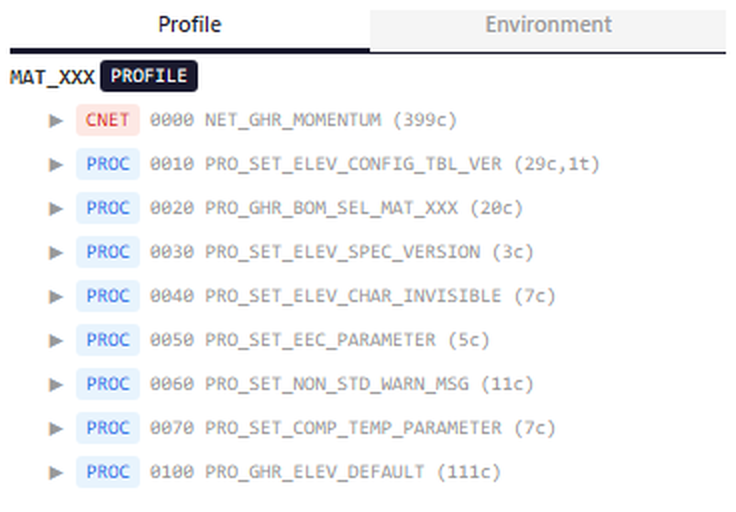
Click any item to navigate. Click a procedure name and the middle panel opens its source. Click a class and the middle panel shows all its characteristics. Click a BOM item and you see the component details plus any linked dependencies.
Middle panel — detail view. Context-sensitive.
When you click a procedure in the left panel, the middle panel shows its source code with syntax highlighting. Keywords like IF, AND, IS_A are colored. Comments starting with * are styled. Characteristic names are recognized.
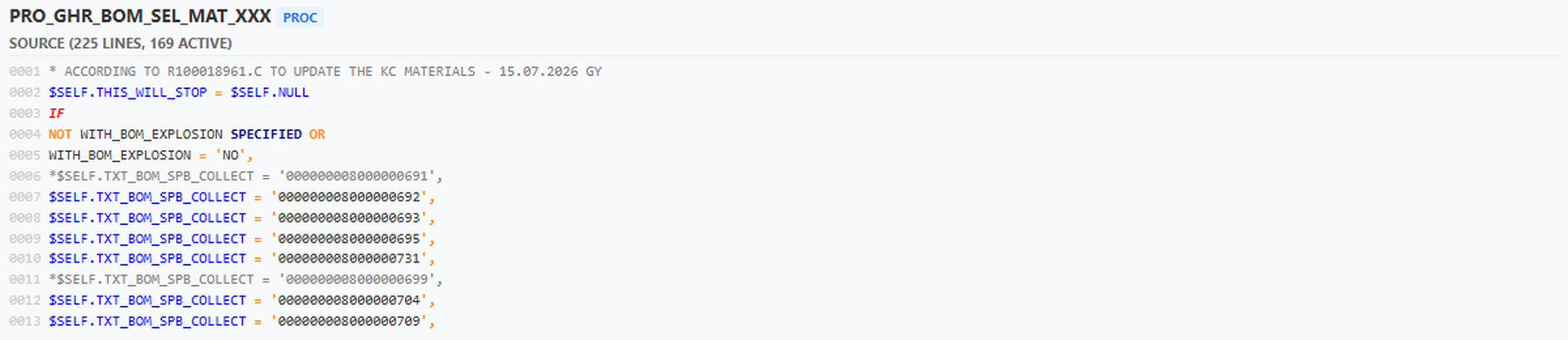
When you click a class, the middle panel shows the class header. It lists all characteristics with links back to their usage in procedures.
When you click a BOM item, the middle panel shows its metadata and any linked dependencies.
Right panel — reference analysis.
When you click a characteristic anywhere in the left or middle panel, the right panel shows every place it appears. It groups results into three sections: classes that own the char, procedures and constraints that reference it, and variant tables that use it. Each entry shows whether the char is read, written, or defaulted in that context. A small count next to each entry shows how many times the char appears in that dependency's source.
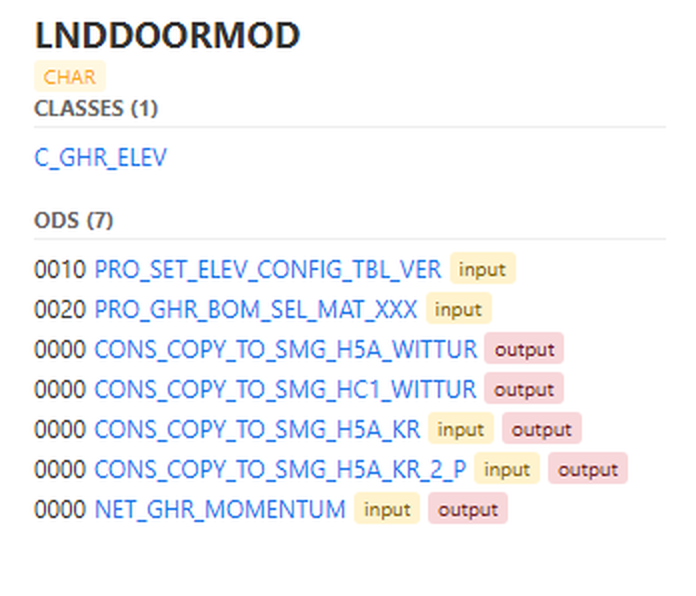
Click any link in the right panel and the middle panel navigates to show that item's detail. The navigation is fully reversible.
BOM Expansion
The --fetch-bom flag adds the configurable BOM to the Environment tab. You see the BOM header, all top-level items, and class items expandable to show classified materials underneath.
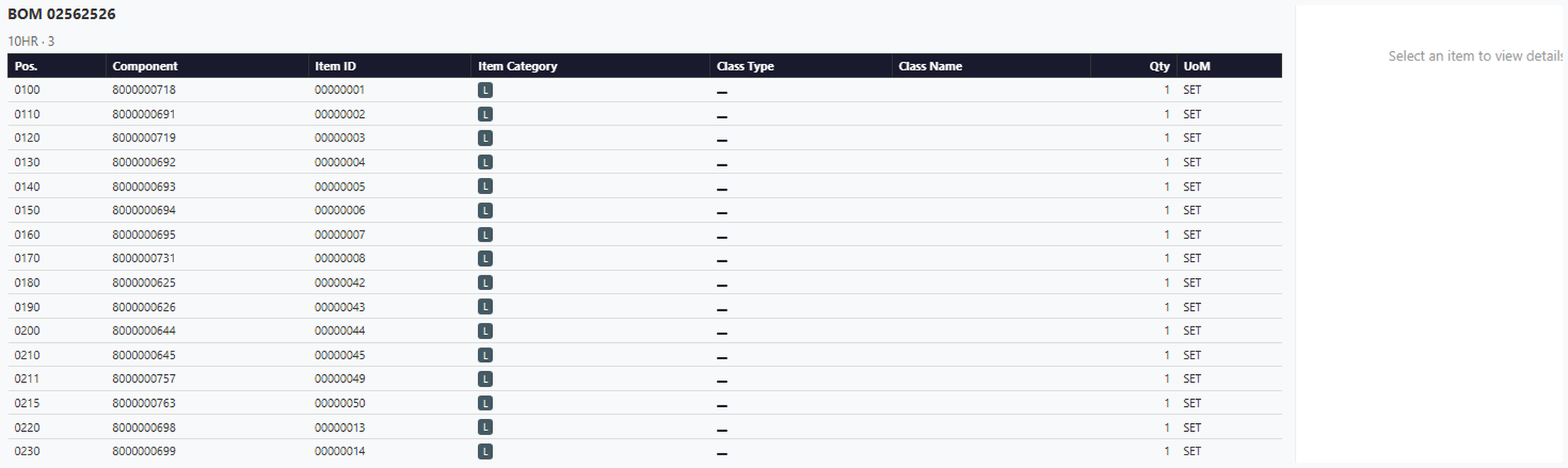
Click a BOM item to see its metadata and any dependency links attached to it. Click a class item to see the characteristics that control which variants are classified under it. The BOM structure nests recursively — each K-category item can expand to show its classified sub-materials.
This lets you trace from a finished product down through every BOM level to the component that a dependency references.
How the Grammar Works
The tree-sitter grammar parses real VC source code from production systems. It was validated against twenty-one production files spanning nearly eighteen thousand lines.
The tokenizer handles procedure blocks, constraint sections (OBJECTS, CONDITION, RESTRICTIONS), variant function calls, table references, and characteristic expressions with $SELF, $PARENT, and alias notation.
One gotcha that cost me an hour: the grammar defines comment_statement, not comment. The ZED highlights query must use the exact node name. Wrong name and ZED refuses to load the language at all. The error message says Invalid node type "comment" and gives you no other hint.
The ZED Extension
The ZED extension wires the grammar into an actual editor. It is thirty-eight lines of Rust. The grammar does the heavy lifting for highlighting. The LSP server does the heavy lifting for diagnostics.
When you open a .sapvc file in ZED, the editor detects the language from path_suffixes in the language config. A .txt file whose name starts with PRO_ or CONS_ is detected from path_prefixes. Both rules live in config.toml inside the extension. settings.json file_types globs do not work in dev extension mode — that was a dead end.
The LSP connects to ZED over stdio. It receives material metadata at startup and uses it for semantic validation. Unknown characteristic names become warnings. Invalid variant table references become errors.
When you type a dot after a characteristic name, completion triggers. When you right-click a characteristic and choose Go to References, the editor finds every place that char appears across all dependencies.
Diagnostics appear as red wavy lines under syntax errors. Missing colons, unmatched blocks, unknown keywords — all caught before you save the file.
Why This Matters
SAP sells PMEVC as the future of variant configuration. But the current editing experience is still notepad-like. No source control. No diff. No autocomplete. No validation until runtime.
What I built proves the technology exists. Tree-sitter grammars for domain-specific languages are mature. LSP servers in Rust are production-ready. ZED and VS Code extensions are well-documented.
The missing piece is SAP commitment to ship this inside PMEVC.
Instead of forcing users to edit dependencies in GUI transactions, PMEVC can offer:
- Source-based editing — open constraint files directly, with syntax highlighting
- Real-time diagnostics — catch errors before they reach the system
- Interactive visualization — see dependency graphs while editing
- BOM context — navigate from dependencies into product structure
- Git integration — version control for dependency changes
- Collaboration features — code review for constraint modifications
This is not speculative. It is what my team built in three weeks with open-source tooling. My team uses it every day.
What Is Missing
The current implementation covers syntax and basic semantics. A full PMEVC integration will need:
- Live SAP connection — fetch dependency source from server, not only local files
- Write-back support — save changes back to SAP via BAPI or RFC
- Multi-file navigation — jump between related dependencies across materials
- Pricing rule editing — extend to Logic and Price model syntax
- Migration tools — compare dependency versions, detect breaking changes
These are engineering problems, not fundamental limitations. The stack supports them.
The Bottom Line
I built this as a proof of concept. It shows how an editor experience for PMEVC works in practice. Three weeks of work produced a working language server with diagnostics, highlighting, and visualization. My team uses it daily to understand and edit dependency source.
SAP has the technology to ship this inside PMEVC. What they need is the roadmap commitment.
The question is not whether it is possible. It is whether PMEVC will offer this experience natively, or leave it to tools like mine.
For now, I will keep using the stack I built. It is faster than SAP GUI, more precise than manual validation, and it understands the dependency language.
That is the PMEVC I want.
Three repos, one vision. tree-sitter-sapvc, sapvc-lsp, and zed-sapvc are private GitHub repos under zpage/. The OD graph tool is in sap-vc-od-graph/.